TechTrackDevice SetupLast updated: 06/16/2026
Device Setup - Contacts
Add contacts and contact groups for alert notifications and report subscriptions in Step 3 of the Device Setup.
The Contacts step of the Device Setup provides a tool for users to add contacts to be used for alert notifications and report subscriptions. This is similar to an address book in your email account or smartphone. Contact Groups offer the ability to group contacts into a list. These contact groups can then be used for alert notifications. Following the instructions below to add Contacts and Contact Groups.
ℹ️
Note Contacts and Contact Groups are global settings, meaning once you create contacts or contact groups they will be accessible from any device.
Getting to the Device Setup page:
To get to the Device Setup follow the instructions below:
1
Login to the Datablaze Web Portal at https://my.datablaze.com.
2
Click the menu icon at the top left of the screen, then select "Devices".
3
From the Device List, click on the name of the device would like to setup.
4
From the Device Dashboard, click the menu icon at the top left of the screen, then select "Setup" under the Device header.
5
Next, click "3 Contacts" at the top of the wizard.
Create a Contact:
1
First, click the "Add" button at the bottom-left of the wizard.
2
Complete the contact form, including name, email, phone, and phone carrier. NOTE: Only one contact method is required. However, keep in mind that without an email address the contact will not be able to use the report subscription feature. Phone carrier is required in order to successfully receive alert notifications from Datablaze.
3
Click the "Add Contact" button on the window.
4
Notice the new contact card with your saved contact information.
Create a Contact Group:
1
First, click the "Groups" tab.
2
Next, click the "Create" button to create a new group.
3
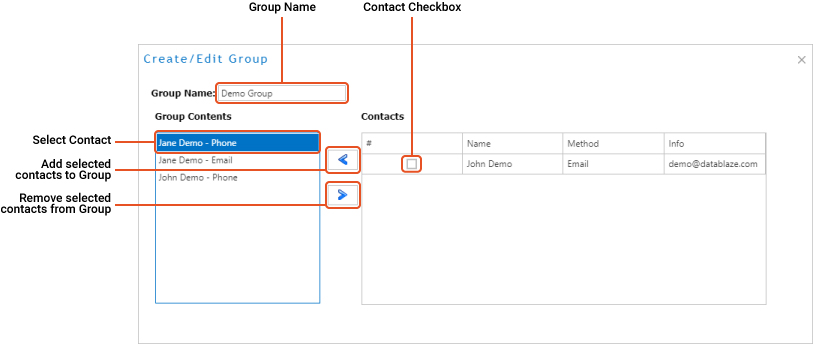
The Create/Edit Group window will appear. Enter a name for the group in the Group Name box. NOTE: It is important to name Groups with a unique name. When selecting contacts for notifications, all individual contacts and contact groups are shown in the selection box. In order to differentiate between individual contacts and contact groups, be careful to name the Group something identifiable.
4
Then, check the boxes next to the contacts you would like to add to the group. NOTE: Each individual contact may have two contact methods, Phone and/or Email.
5
Once all contacts have been selected, click the left arrow button to move them to the Group Contents box.
6
To remove contacts from the group, click on the contact in the Group Contents box, then click the right-arrow button.
7
Now that the selected contacts are in the Group Contents, click the "Save" button at the bottom-left of the window.
8
Notice the new contact group card shown in the Groups tab.
Edit a Contact or Contact Group:
1
To edit a contact or contact group click on the contact card in the appropriate tab.
2
The card will be highlighted in blue, once the card is highlighted, click the Edit button at the bottom-left of the screen. Alternatively, you can double-click the card to Edit.
3
Make adjustments as necessary, then click the "Update" button.
Was this article helpful?
That’s Great!
Thank you for your feedback
Sorry! We couldn't be helpful
Thank you for your feedback
Feedback sent
We appreciate your effort and will try to fix the article