TechTrackWeb PortalLast updated: 05/08/2026
Support Tickets on the Device Dashboard
Creating a new support ticket and reviewing the status of tickets you've already submitted.
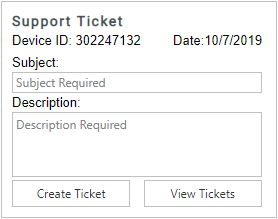
The Support Ticket section is an easy way to get in touch with us. Fill out the subject and a short description of your issue and click Create Ticket. A Datablaze representative will reach out to you typically within 24 hours.
You can also hit the “View Tickets” button to look at the status of any tickets that you have previously created.
Was this article helpful?
That’s Great!
Thank you for your feedback
Sorry! We couldn't be helpful
Thank you for your feedback
Feedback sent
We appreciate your effort and will try to fix the article